
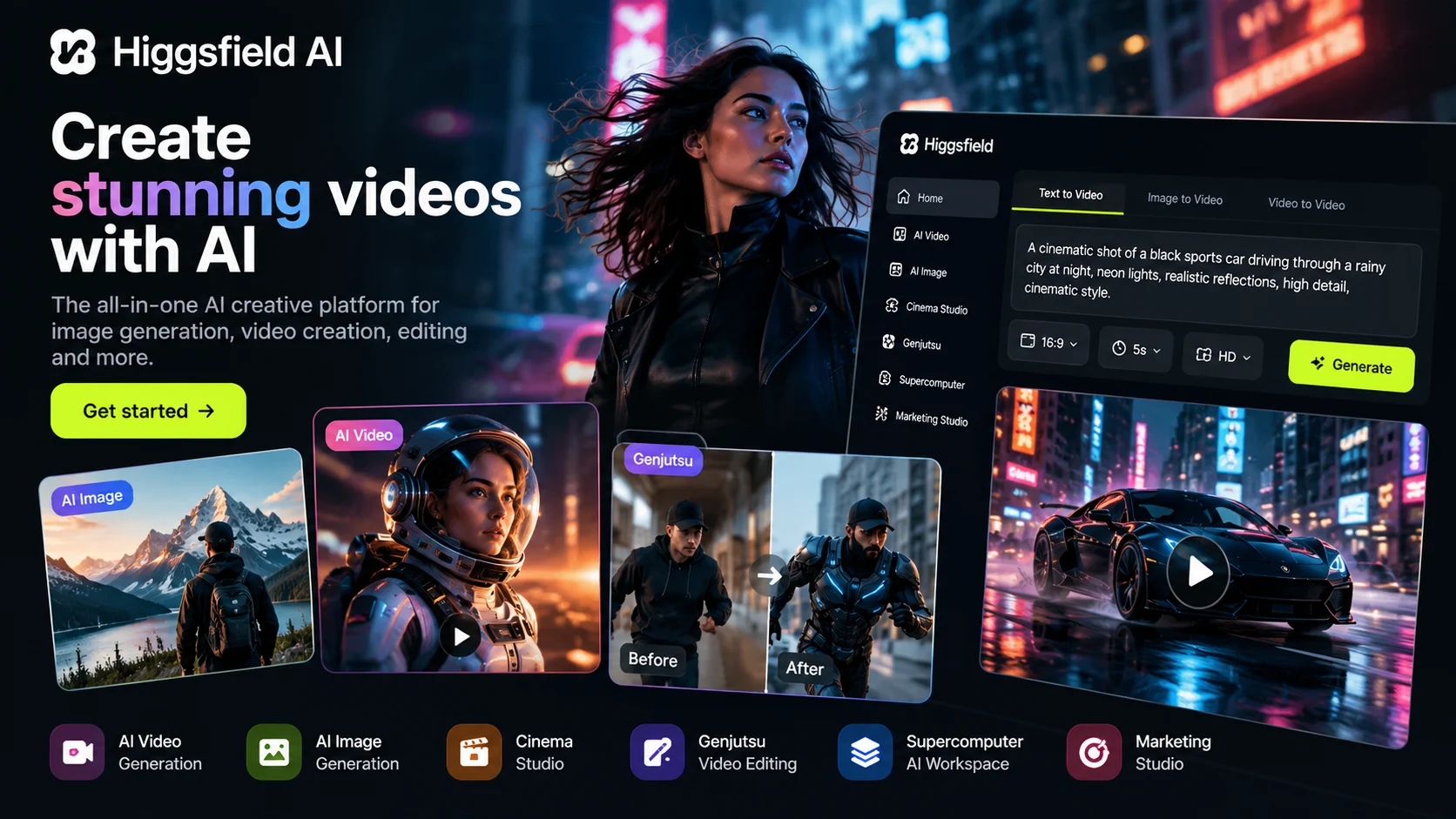
Higgsfield AI is an AI-powered creative platform that helps users generate images, create videos, edit existing footage, and develop visual content for social media, advertising, and filmmaking. It brings multiple creative tools and AI models into one environment, making it useful for beginners as well as experienced creators. If you are searching for what Higgsfield AI is, what it is used for, or whether it is free, this guide explains its main capabilities, how to get started, its pricing considerations, and the limitations you should understand before using it.
What Is Higgsfield AI?
Higgsfield AI is an AI creative platform designed primarily for image generation, video creation, visual editing, and creative production workflows. Instead of relying on a single AI model, the platform brings together different models, specialized tools, and workspaces for producing visual content.
Users can describe an idea in text, work with reference images, or use existing footage in supported workflows. Depending on the selected feature, Higgsfield can help turn those inputs into generated images, cinematic video clips, advertising creatives, or modified video scenes.
The platform also includes specialized products such as Cinema Studio, Supercomputer, and Genjutsu. These serve different purposes, from developing cinematic scenes and coordinating creative tasks to modifying elements in existing videos.
Higgsfield is intended for a broad audience, including social media creators, YouTubers, marketers, advertising teams, and filmmakers. However, the available tools, generation limits, and costs can differ by feature and subscription.
What Is Higgsfield AI Used For?
Higgsfield AI can support several types of creative work. The most suitable feature depends on whether you want to create something new, modify existing footage, or organize a larger production workflow.
1. Creating AI Videos
Higgsfield offers video-generation tools that can turn text descriptions and supported visual inputs into video clips. Creators can use these tools to develop cinematic scenes, concept videos, short-form content, and promotional visuals.
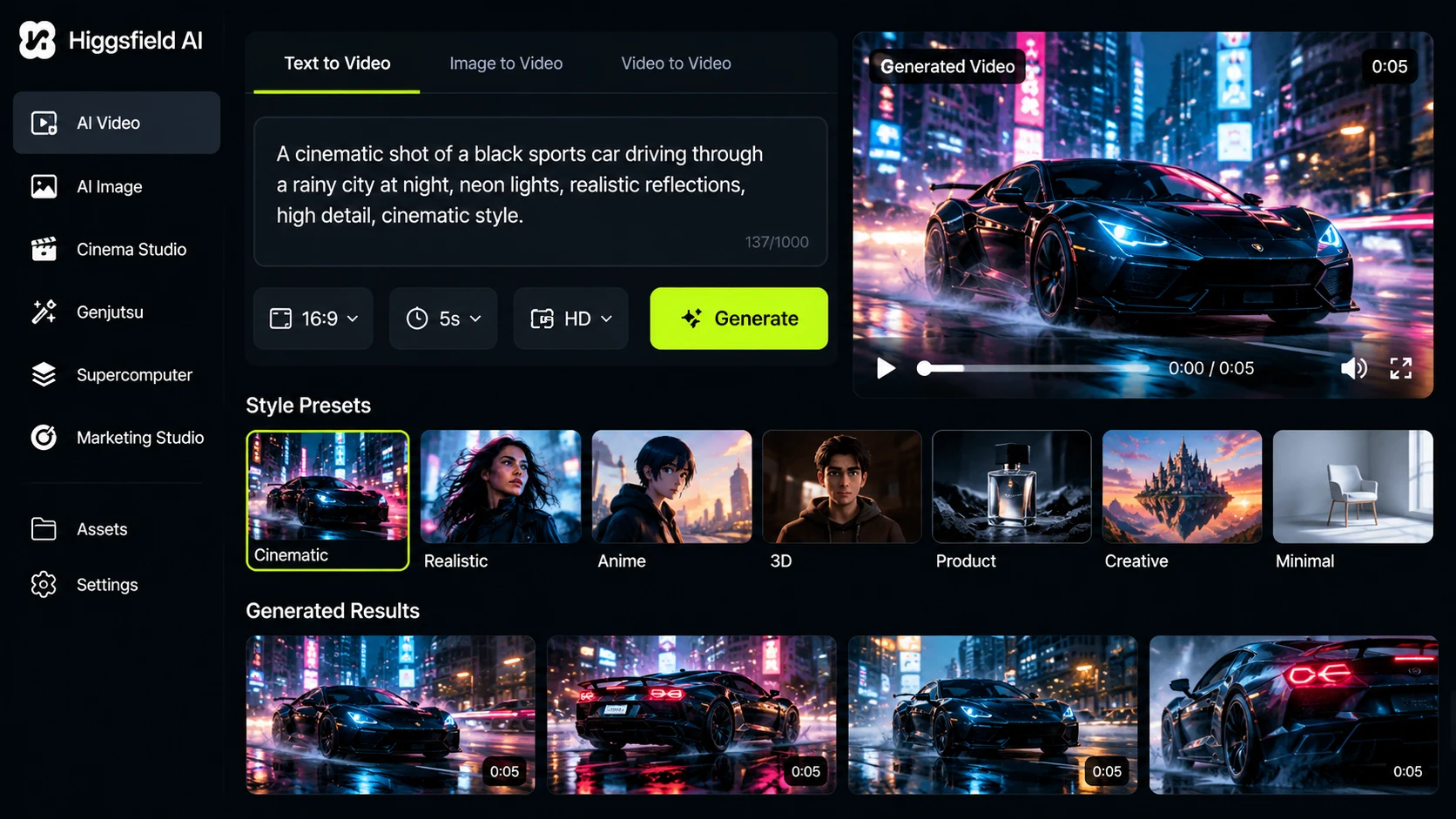
For example, a creator could describe a cinematic shot of a sports car driving through a rainy city at night. The selected video model would attempt to generate a clip based on the description and its supported capabilities. The result may require several iterations to achieve the desired motion, lighting, and composition.
2. Generating AI Images
The platform also provides image-generation tools for creating visual concepts, product imagery, fashion visuals, character designs, and advertising assets. Depending on the selected model, users may be able to generate images from text or use reference images to guide the result.
These capabilities can help creators explore different visual directions before investing time in a photoshoot or a larger production. Generated images should still be reviewed for unwanted details, inaccurate text, and inconsistencies.
3. Editing Existing Videos
Higgsfield Genjutsu is designed for modifying selected elements of existing footage. Its documented workflows include Motion Transfer, which uses movement from a source video to guide a new scene, and Object Swap, which targets a specified element while attempting to preserve the surrounding footage.
For example, a marketer might use a supported workflow to explore a different product appearance or character in an existing clip. The result is not guaranteed to preserve every original detail perfectly, so review the generated footage before publishing it.
4. Producing Social Media and Advertising Content
Creators and marketing teams can use Higgsfield to develop content for platforms such as YouTube Shorts, Instagram Reels, and TikTok. Its creative tools can help with product advertisements, promotional videos, campaign variations, and visual storytelling.
A small business could use AI-generated product visuals to test several creative concepts before choosing which ones deserve a larger production budget. Actual advertising performance still depends on factors such as the offer, audience, distribution, and creative quality.
5. Planning Cinematic Scenes
Cinema Studio provides a workspace for cinematic video creation, while other tools support visual planning and creative development. These capabilities can help filmmakers explore camera angles, scene composition, lighting, and storytelling ideas before or during production.
For users who want to coordinate multiple steps, Higgsfield Supercomputer provides an agentic workspace that can work across research, writing, files, code, and creative generation. Its role is broader than simply generating an image from one prompt.
What Are the Main Features of Higgsfield AI?
Higgsfield combines multiple creative capabilities rather than offering only one image or video generator. The exact features available to you may depend on the selected tool, model, account, and current plan.
| Feature or tool | Primary purpose |
|---|---|
| AI Video | Generate video clips using supported models and inputs. |
| AI Image | Create images and visual concepts. |
| Cinema Studio | Develop cinematic scenes with specialized filmmaking controls. |
| Genjutsu | Modify selected elements of existing footage using supported workflows. |
| Supercomputer | Coordinate multi-step research, creative, and other AI-assisted tasks. |
| AI Image Editing | Modify images using the available editing tools. |
| Marketing Studio | Support advertising and marketing creative workflows. |
| MCP integration | Connect supported Higgsfield capabilities to compatible AI clients and agents. |
This overview describes the purpose of these tools, not a guarantee that every feature is included in every subscription. Check the official product pages before relying on a particular model, output format, or control.
How to Use Higgsfield AI
You can start by visiting the official Higgsfield website and choosing the type of creative task you want to complete. The exact interface may change as the platform adds new features, but the following workflow provides a practical starting point.
- Open the official website. Visit higgsfield.ai and review the available image, video, editing, and creative tools.
- Create an account or sign in. Follow the account instructions displayed by the official website. Check any access or subscription requirements for the tool you want to use.
- Choose the appropriate feature. Select an image generator for a new visual, a video-generation tool for a clip, or an editing workflow if you want to modify existing footage.
- Prepare your input. Write a clear description of your desired result. If the selected workflow supports reference images or video, upload suitable material that you have permission to use.
- Review the available settings. Choose from the models, presets, and controls actually shown in your account. Check the displayed credit cost before starting a generation when applicable.
- Generate the result. Submit your instructions and wait for the tool to process the request.
- Review and refine. Check the output for unwanted changes, incorrect details, inconsistent motion, or other issues. Adjust your instructions and try again if needed.
- Export or download your work. Use the export options available for your chosen workflow and confirm the relevant usage terms before publishing or selling the result.
Example of a Prompt for an AI Video
If your selected Higgsfield video model accepts text prompts, you can begin with a description like this and adjust it to match your project.
Example prompt: Create a cinematic promotional video featuring a premium black sports car driving along a wet urban street at night. Use realistic reflections on the road, atmospheric city lighting, controlled camera movement, natural vehicle motion, detailed bodywork, and a polished commercial aesthetic. Keep the car as the main subject and maintain a consistent visual style throughout the shot. Avoid distorted wheels, flickering lights, and sudden changes in the vehicle’s appearance.
This is a general example, not a proprietary Higgsfield prompt or a guarantee of the result. Camera controls, duration, aspect ratio, and other settings should be selected only when the chosen model supports them.
Is Higgsfield AI Free or Paid?
Higgsfield offers subscription-based access and has also advertised limited free-access opportunities for certain features or promotions. However, free access should not be confused with unlimited access to every image and video model.
The platform’s pricing and credit rules can change. Some workflows use credits for generation, and the amount required may depend on the model, output settings, duration, or resolution. A subscription may also provide access to specific tools or time-limited benefits.
To check the current price:
- Open the official Higgsfield Pricing page.
- Review the currently displayed plans and billing periods.
- Check the included credits, eligible models, generation limits, and any promotional conditions.
- Confirm whether the particular feature you need is included before subscribing.
Official pricing page: https://higgsfield.ai/pricing
Exact current subscription prices, the standard free-plan allowance, and universal credit limits could not be verified from an official source in this research. Check the live pricing page and the relevant feature’s own pricing information rather than relying on an outdated price quoted elsewhere.
Does Higgsfield AI Offer Unlimited Credits?
Do not assume that a plan or promotion described as unlimited means unlimited access to every model, setting, or workflow without restrictions. Higgsfield has published information about specific unlimited-generation offers, including eligibility conditions and time-limited access.
Before purchasing, check which models qualify, how long the offer lasts, whether resolution or duration restrictions apply, and whether the offer requires a particular subscription. The terms of a past promotion should not be treated as the terms of the current plan.
Which AI Models Does Higgsfield Use?
Higgsfield brings together its own creative technology and models from other AI developers. Its official website lists video models such as Seedance, Kling, Sora, Veo, WAN, and Gemini Omni Flash, alongside image models such as Nano Banana, Flux, Seedream, GPT Image, and Ideogram. The available selection may change over time.
The platform also describes proprietary tools and systems, including Soul 2.0 for photorealistic image generation, Soul Cinema, Higgsfield DOP, and Cinema Studio. These serve different creative purposes and should not be confused with every third-party model available through the platform.
There is no single model that necessarily powers every Higgsfield feature. The model used depends on the workflow and the available selection. If you need a specific model, confirm its current availability in the relevant tool before starting a project.
What Is Higgsfield Supercomputer?
Higgsfield Supercomputer is an agentic workspace designed to coordinate multiple steps of a task. Rather than using a separate tool for every part of a project, users can describe a goal and let the system help with research, writing, code, files, and creative production.
For example, a creator planning a product advertisement could use an AI-assisted workflow to develop a concept, prepare supporting material, and work toward generating visual assets. The specific actions available depend on the tools and integrations enabled in the account.
Supercomputer is also relevant to searches for the term Higgsfield AI supercomputer. It is not simply a consumer computer or a single image-generation model; it is a software workspace for coordinating AI-assisted tasks.
What Is Higgsfield MCP?
MCP stands for Model Context Protocol, an open standard that allows compatible AI applications to connect to external tools and services. Higgsfield’s MCP integration can connect supported image, video, and other creative capabilities to compatible AI clients or agents.
For example, an eligible connected workflow may let a user describe a creative task in a supported AI chat and invoke Higgsfield capabilities without manually switching between every interface. Availability depends on the client, integration setup, and current service requirements.
MCP is an integration method, not a separate AI image model. Users should follow the current official setup instructions and check permissions before connecting external applications.
What Is Higgsfield Genjutsu AI?
Higgsfield Genjutsu is a video-editing tool designed to rebuild selected parts of an existing clip without requiring the entire scene to be recreated from scratch. Its documented features include Motion Transfer and Object Swap.
- Motion Transfer: Uses movement from an existing video to guide a new character or scene.
- Object Swap: Targets a selected object or element for replacement while attempting to preserve the surrounding shot.
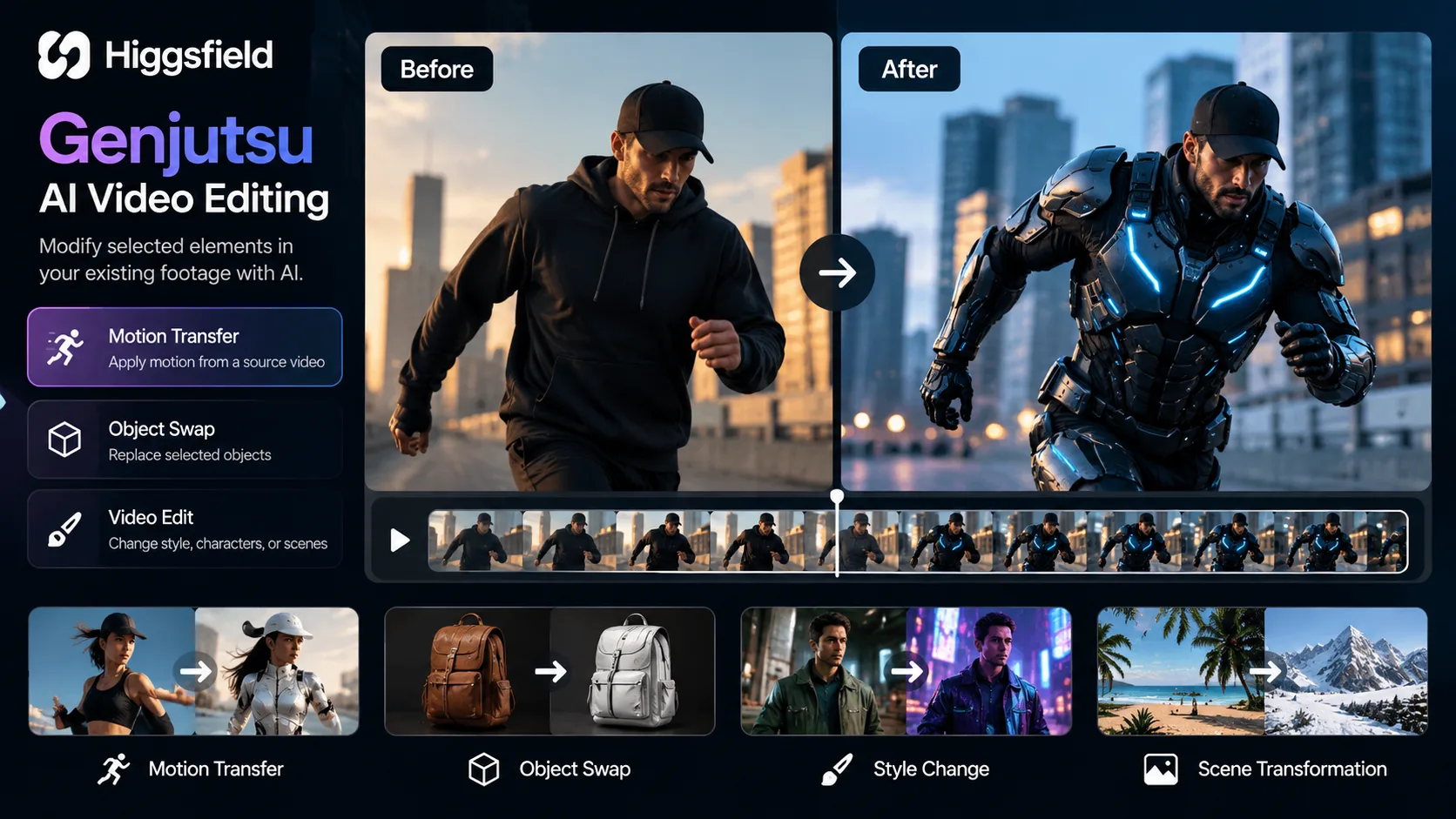
According to Higgsfield’s published Genjutsu guide, the workflow supports source clips between 4 and 30 seconds and up to 30 reference images per generation, with output resolution up to 1080p. These are feature-specific published specifications and should be checked again before use.
Genjutsu may be useful for creators who want to explore alternate characters, outfits, styles, or product-ad variations using existing footage. However, results can still contain visual inconsistencies, and preserving the original shot perfectly is not guaranteed.
Is Higgsfield AI Available on Android?
If you want to use Higgsfield on Android, begin with the official website in your mobile browser. Confirm whether the specific tool you need is supported in that browser and whether the platform offers an official mobile app in your region.
Do not download an APK from an unfamiliar website simply because it claims to offer Higgsfield AI. An unofficial installation file may be outdated, modified, or unsafe. If an official Android app is available, use the verified store listing linked by the developer.
Current official Android app availability and a verified standalone APK download could not be confirmed from an official source in this research. This does not establish that no app exists; check Higgsfield’s official website for the latest supported access methods.
Advantages and Limitations of Higgsfield AI
Advantages
- Multiple creative workflows: The platform brings image generation, video creation, editing, and other creative tools together.
- Useful for creators: It can support short-form content, product visuals, advertising concepts, and cinematic experiments.
- Options for different skill levels: Beginners can start with text descriptions and presets, while advanced users can explore specialized creative controls.
- Model choice: The platform provides access to different models and workflows, subject to availability and plan requirements.
- Editing existing footage: Specialized tools such as Genjutsu can help users explore changes to selected parts of a clip.
Limitations
- Variable results: Generated images and videos may not precisely match the original instructions.
- Credit costs: Repeated generations and higher-cost workflows can increase expenses.
- Changing availability: Features, models, pricing, and access rules may change over time.
- Model-specific controls: Not every model supports the same inputs, editing capabilities, or output settings.
- Review is still necessary: Generated footage may contain inconsistent details, motion errors, or other visual defects.
- Usage rights need checking: Commercial permissions, privacy terms, and restrictions should be reviewed before using generated content in client projects or advertising.
Common Mistakes to Avoid When Using Higgsfield AI
- Writing vague prompts: Specify the subject, action, environment, visual style, and important constraints.
- Ignoring credit costs: Review the displayed cost and plan conditions before generating multiple versions.
- Expecting identical results: Different models may interpret the same instructions differently.
- Using unofficial downloads: Access the platform through official channels and verify any app listing.
- Skipping quality checks: Review motion, faces, product details, and background consistency before publishing.
- Uploading sensitive material without review: Check the privacy policy and relevant account settings before providing confidential files or personal images.
- Assuming every feature is included: Confirm the model, tool, and plan requirements for your intended workflow.
Is Higgsfield AI Worth Using?
Higgsfield AI may be worth exploring if you regularly create visual content and want access to image generation, video generation, and specialized creative workflows in one platform.
It may suit YouTubers and social media creators who need visual concepts, marketers who want to develop advertising variations, and filmmakers who want to explore cinematic scenes or modify existing footage. Its usefulness depends on the quality you need, the tools available to your account, and how much you are willing to spend on generation.
For occasional experimentation, start by checking available free access and testing a small project. For regular commercial work, compare the current subscription cost, credit requirements, output quality, and usage terms against your production needs before committing.
Frequently Asked Questions
What does Higgsfield AI do?
Higgsfield AI provides tools for generating images and videos, editing visual content, developing cinematic scenes, and coordinating creative workflows. The available capabilities depend on the selected product and model.
Is Higgsfield AI free or paid?
Higgsfield offers paid subscription options and has advertised certain free-access opportunities. The exact current free allowance, pricing, and credit limits should be checked on the official pricing page.
Which AI does Higgsfield use?
Higgsfield combines proprietary creative technology with third-party AI models. Its official product information lists different image and video models, and the available model depends on the selected workflow.
Can Higgsfield AI create videos from text?
Yes, Higgsfield provides video-generation workflows that support text descriptions. The supported inputs, controls, duration, and output options vary by model.
What is Higgsfield AI best for?
It is particularly relevant to visual content creation, including AI-generated videos, images, advertising creatives, cinematic experiments, and supported video-editing workflows.
Can I use Higgsfield AI for commercial projects?
Commercial use depends on the applicable terms, the tool or model used, and any relevant licensing or content restrictions. Review the current official terms before using generated material in paid client work or advertisements.
Final Takeaway
Higgsfield AI is a creative platform that brings together AI image generation, video creation, visual editing, and broader production workflows. It can help beginners and experienced creators develop visual content without relying entirely on traditional production methods.
Before getting started, identify the specific task you want to complete, choose the appropriate tool, and verify its current availability and credit cost. Test the results carefully, review usage rights, and compare the cost with your needs. This approach will help you decide whether Higgsfield AI is a practical fit for your creative workflow.




Join Our Community
Stay connected and get the latest AI prompts, tools and tech tips.
Related Latest Posts
Free AI Video Generator: Best Tools to Try in 2026
Android October 2026 Google Play System Update: How to Check
15 Halloween AI Photo Prompts for Gemini & ChatGPT (2026)
How to Free Up Storage on iPhone: 10 Easy Ways